Bulk Download Your Suno Catalogue Before 3 September
A suno bulk download is normally a convenience. From 3 September 2026 it becomes a deadline, because the new caps apply retroactively to every track you have ever generated — not just the ones you make after the date.
- The caps are retroactive. Suno's own FAQ states download limits apply to all music on the platform from 3 September, including songs created before that date.
- Free accounts drop to seven lifetime downloads, personal and non-commercial only. Pro gets 20 a month, Premier 60, both with commercial rights. Suno Studio is exempt.
- Unused monthly downloads do not carry over — they reset on your billing date, so stockpiling allowance ahead of the deadline is not possible.
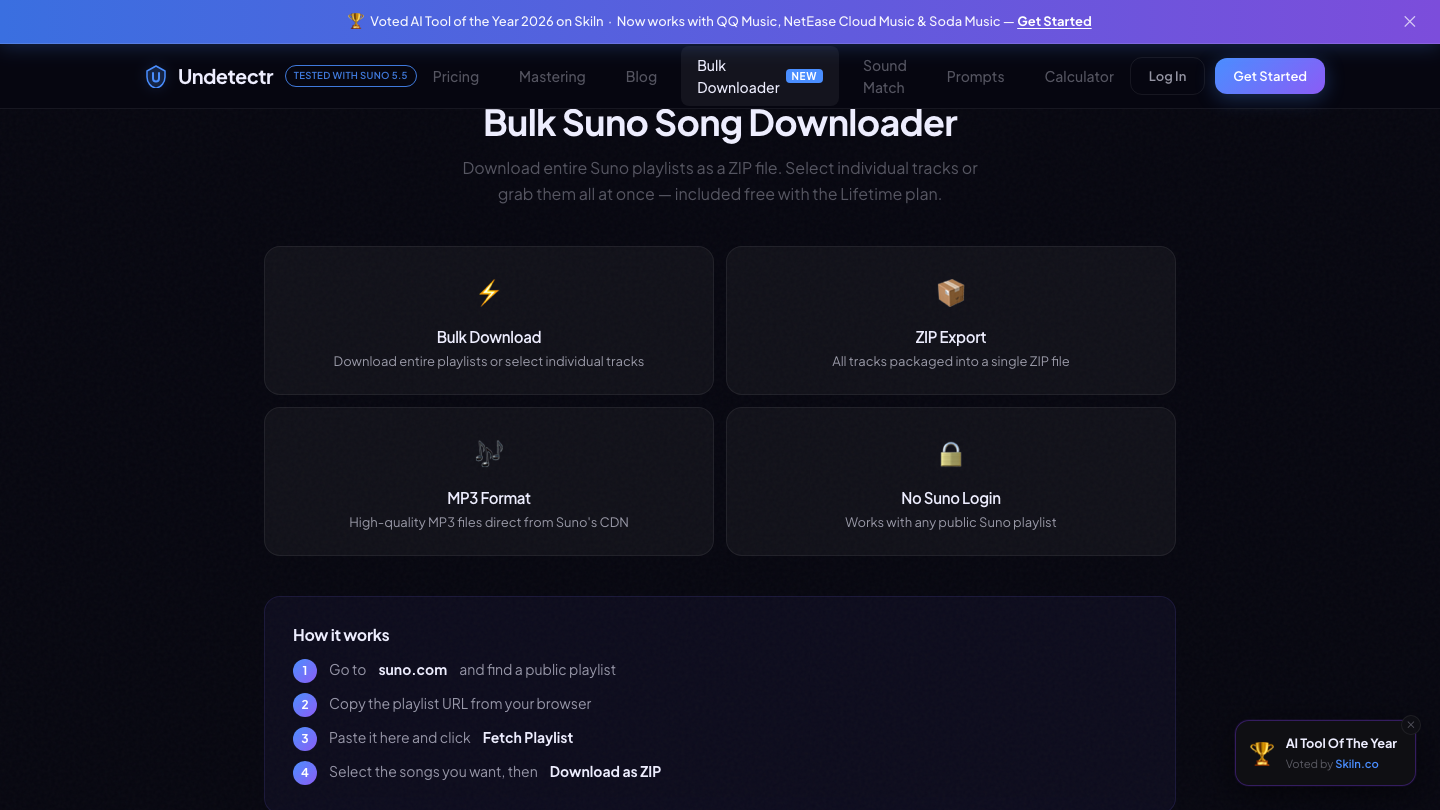
- Bulk exporting a public playlist as a single ZIP is the fastest way to secure a back catalogue. Undetectr's Suno importer does it without a Suno login.
- Exporting is only half the job. Watermarking arrives separately, and independent testing put signal-level processing well ahead of DAW-based cleanup for distributor acceptance.

A suno bulk download is usually a matter of convenience — a way to avoid clicking through a hundred tracks one at a time. From 3 September 2026 it stops being convenient and starts being time-limited, because Suno's new download caps apply to your entire existing catalogue rather than only to what you make after the date.
That retroactive detail is in Suno's own FAQ: download limits apply to all music on Suno from 3 September, including songs created before that date.
At the time of writing there are ten days left.
What actually changes on 3 September
| Tier | Cost | Download allowance | Rights |
|---|---|---|---|
| Free | — | 7 total, lifetime | Personal, non-commercial only |
| Pro | $8/month | 20 per month | Commercial |
| Premier | $24/month | 60 per month | Commercial |
| Suno Studio | — | Exempt | Commercial |
Three details in that table do more work than the numbers themselves.
The free tier's seven is a lifetime figure, not a monthly one. There is no month in which it resets. Suno describes them as trial downloads for personal, non-commercial use, which also means the free tier stops being a viable route to a releasable catalogue rather than merely a slower one.
Unused downloads do not carry over. Monthly allowances reset on your billing date. Upgrading to Premier in late August to bank 60 downloads and spend them in October does not work — the allowance expires with the cycle.
The caps are retroactive. This is the part that turns a policy change into a deadline. Every track sitting in your library from the past eighteen months falls under the same allowance as anything you generate tomorrow.
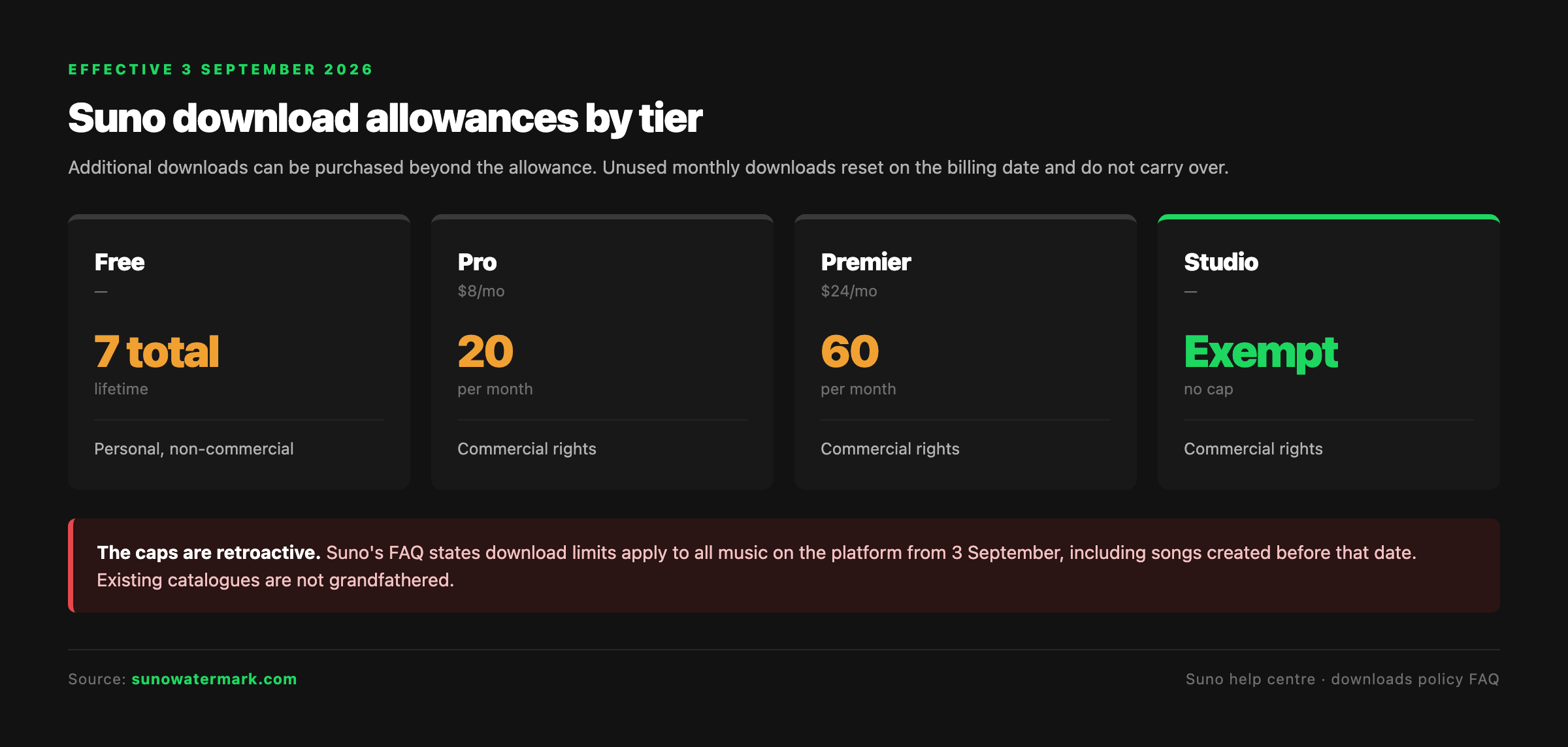
Our full breakdown of the caps covers the tier economics in more depth. The point here is narrower: whatever you have not exported by 3 September competes for the same small allowance as everything you make afterwards.
Why the back catalogue is the exposed part
Work in progress is not the problem. If you generate a track next week and export it next week, the cap costs you one download out of twenty and you would probably have used it anyway.
The exposure is historical. A producer who has been generating on Suno since early 2025 might hold several hundred tracks, of which perhaps thirty are genuinely worth releasing — but which thirty is a judgement that gets made over months, as ideas resurface and old sketches turn out to be better than they seemed.
That workflow assumes the archive stays reachable. From 3 September it becomes rationed. Deciding a track from last November is worth finishing now costs a download from this month's allowance, and so does changing your mind about it.
The cheap version of this problem is solved before the date. The expensive version is solved afterwards, one purchased download at a time.
How to bulk export a Suno catalogue
Suno has no built-in catalogue export. The workable routes are a browser extension, a community script, or a playlist importer — and we compared the full set in our Suno downloader roundup. Under time pressure, the playlist route is the one with the fewest ways to fail.
The sequence is four steps:
- Make a playlist public on suno.com. Add the tracks you want to keep. A private playlist will not resolve, because the importer reads the public page rather than your account.
- Copy the playlist URL from the browser address bar.
- Paste it into the importer and fetch the track list. Undetectr's Suno import page resolves the playlist and lists every track behind it.
- Select what you want and download as a ZIP. Files come as MP3s pulled directly from Suno's CDN, packaged as a single archive.
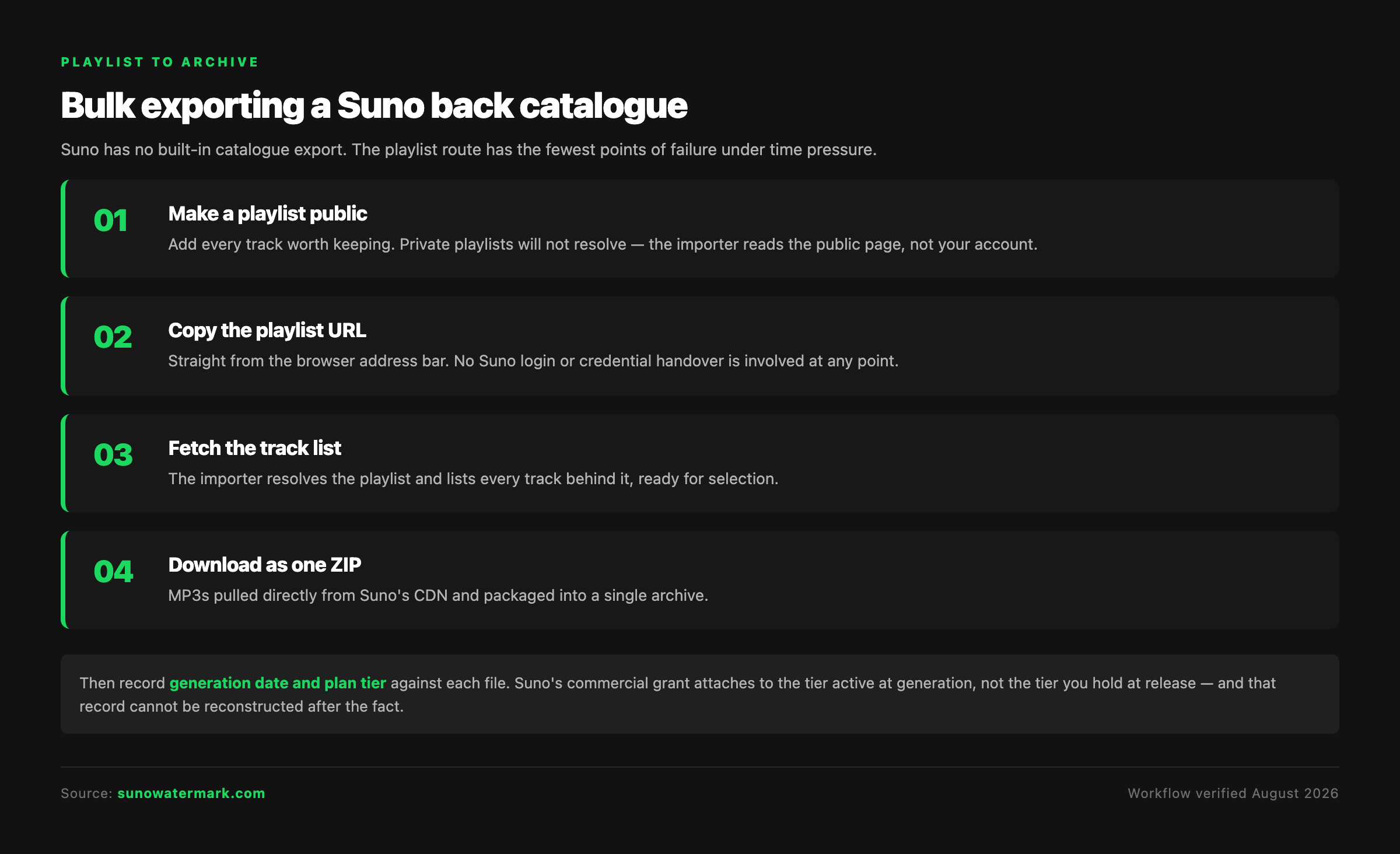
The detail that matters operationally is that no Suno login is required. The importer works from the public playlist, so there is no credential handover and no session to keep alive while a few hundred files transfer. Extensions and scripts generally need one or both.
Record provenance while you export
A folder of five hundred MP3s with no accompanying notes is a rights problem in slow motion. As you export, keep a simple record against each track: generation date, plan tier active at generation, and whether you wrote the lyrics or contributed vocals.
That matters because Suno's commercial grant attaches to the tier active when the track was generated, not the tier you are on when you release it. Our terms audit sets out what each tier actually grants. Free-tier material generated under the new policy is explicitly personal and non-commercial, which is a meaningful narrowing.
The metadata you skip in August is the evidence you need when a distributor or a sync client asks in November.
Exporting is only half the job
Securing the files solves the availability problem. It does not solve the identification problem, which is arriving on its own timetable.
Suno confirmed on 6 August 2026 that it will embed audio watermarking and fingerprinting in generated tracks, with rollout over the following weeks and no technology named. Our technical explainer covers what is known and what is not.
The important part for anyone about to export a catalogue is which layer this operates on. Watermarks and generator fingerprints sit below the threshold of hearing. They are not audio quality defects, which is why the intuitive response — open the file in a mastering chain, EQ the harshness, gate the noise floor — changes nothing at ingest.
Independent testing published in 2026 across artifact removal software put the difference in stark terms. The study ran 50 tracks generated on Suno v5, Udio and Stable Audio through six major distributors:
| Approach | Score | Cost | Time per track |
|---|---|---|---|
| Undetectr | 98/100 | $39 one-time | ~90 seconds |
| iZotope RX 11 | 72/100 | $399 one-time | 4–6 hours |
| Ableton Live Suite | 58/100 | $749 one-time | 6–10 hours |
| Logic Pro | 54/100 | $199 one-time | 6–10 hours |
| FL Studio | 48/100 | $199–$499 | 8–12 hours |
The testers' explanation of the gap is the useful bit: DAW-based tools "mask the obvious sonic symptoms of AI generation" but "cannot remove the underlying fingerprint". Signal-level processing works the other way round, treating the fingerprints as statistical properties to remove by running the same detection models distributors use in reverse.
The reported ingestion results were 49 of 50 passing on Spotify, and 50 of 50 on both TuneCore and DistroKid.
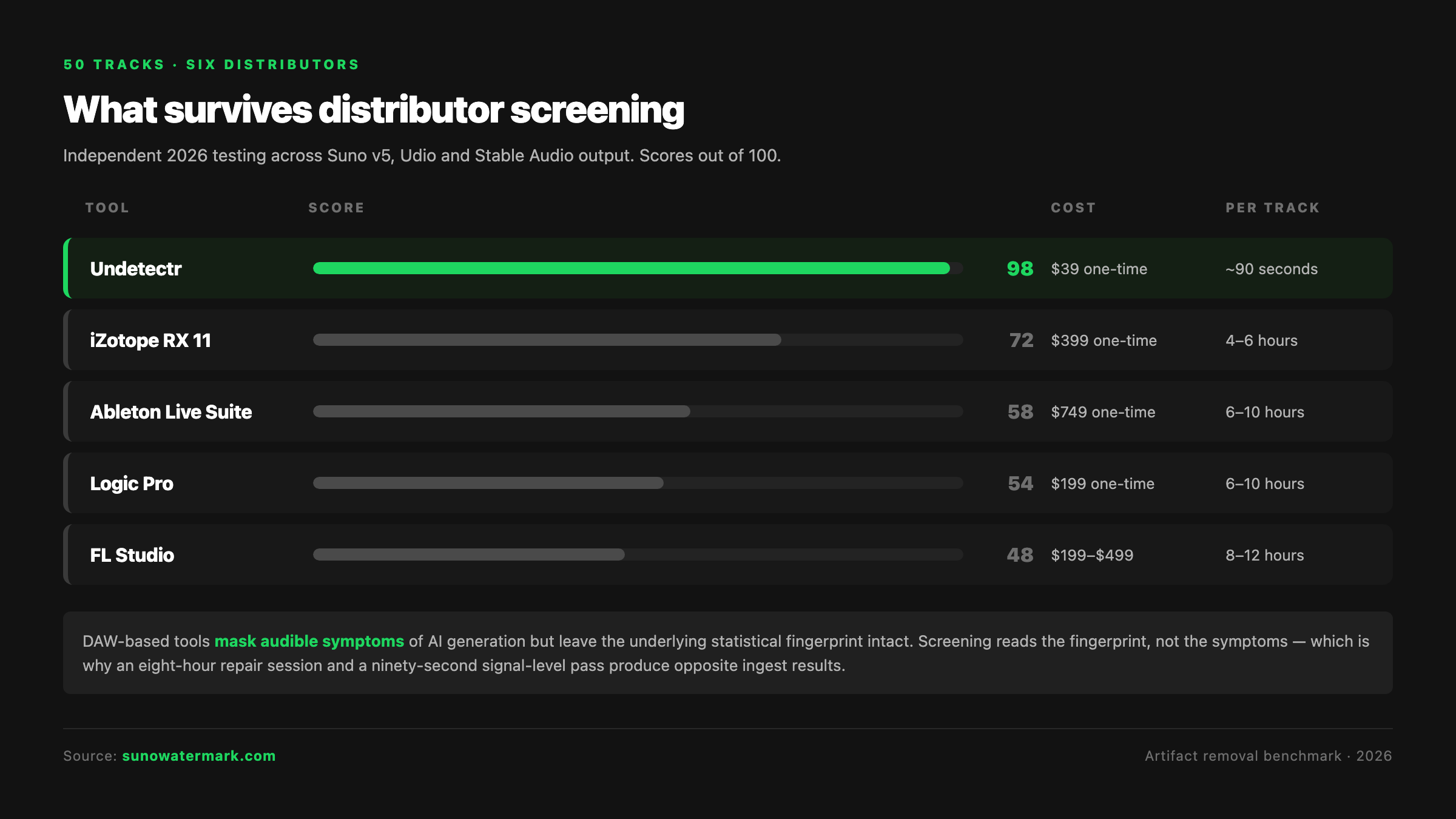
Apply that to a back catalogue and the arithmetic is unavoidable. Thirty tracks at ninety seconds is under an hour. Thirty tracks at six hours each in a DAW is a month of full-time work, for a result the same testing scored forty points lower.
The ten-day plan
Days one to three — decide and gather. Go through the library and build one public playlist of everything you might conceivably want. Be generous rather than selective; the cost of including a track you never use is nothing, and the cost of omitting one is a purchased download later.
Day four — export. Run the playlist through the importer and pull the archive. Verify the file count matches the playlist before you close anything.
Days five to seven — record provenance. Work through the archive noting generation date and plan tier per track. Tedious, and the only part of this that cannot be reconstructed afterwards.
Days eight to ten — process the release candidates. You do not need to process the whole archive, only the tracks you actually intend to release. Run those at the signal layer and keep the processed versions separate from the raw exports.
Anything left over after the deadline is still there — the caps limit exporting, not generating or listening. You will simply be paying per download to reach it.
Three mistakes to avoid this week
Assuming the caps are forward-looking. The single most consequential misreading of this policy is that it applies to new tracks. It does not. Suno's FAQ says all music, including songs created before 3 September.
Banking allowance by upgrading early. Downloads reset on the billing date and do not carry over. Upgrading in August buys you August's allowance, not a stockpile.
Treating a mastering pass as processing. Running exports through a repair suite or a mastering chain addresses audible characteristics. Watermarks and fingerprints are not audible characteristics. It is a category error rather than a matter of finding a better plugin, and it is the most common wasted afternoon in this whole subject.
The bottom line
The date is fixed and the retroactivity is documented. Whatever sits in your Suno library on 3 September becomes subject to the same allowance as everything you make afterwards, and on the free tier that allowance is seven downloads for the lifetime of the account.
Exporting a catalogue is a one-afternoon task while it is still unrestricted. It is a recurring cost afterwards.
Do the export first, because it is the part with a deadline. Do the provenance notes second, because they are the part that cannot be recovered. Process the release candidates at the signal layer third, because that is where distributor screening actually reads — and it is the only one of the three that stays available at the same price after the date passes.
Questions readers ask.
Yes. Suno itself has no one-click catalogue export, but a public playlist URL can be handed to a bulk downloader that fetches every track behind it and packages them as a single ZIP. Undetectr's Suno importer works this way and does not require a Suno login, because it reads the public playlist rather than your account. Chrome extensions and community scripts do the same job with more setup and more breakage.
Yes, and this is the detail most coverage has missed. Suno's own FAQ states that download limits apply to all music on Suno starting 3 September, including songs created before that date. Your back catalogue is not grandfathered. A free account with four hundred tracks generated over the past year will have seven lifetime downloads available to export any of them.
Free accounts get seven in total for the life of the account, described as trial downloads for personal, non-commercial use only. Pro at $8 a month gets 20 downloads monthly with commercial rights. Premier at $24 a month gets 60 monthly with commercial rights. Suno Studio is exempt from the caps entirely. Additional downloads can be purchased once you hit a limit.
No. Suno's FAQ is explicit that monthly downloads reset on your billing date and unused downloads do not carry over. That rules out the obvious workaround of upgrading early and banking allowance through August to spend later. The allowance is use-it-or-lose-it from the first billing cycle onward.
Make the playlist public on suno.com, copy its URL from the browser, paste it into a playlist importer and fetch the track list, then select the songs you want and download them as one archive. Undetectr's importer follows exactly that four-step sequence and pulls MP3s directly from Suno's CDN. It is included with the $39 lifetime plan alongside unlimited track processing.
Downloading music you generated and hold rights to under your plan tier is ordinary catalogue management. What matters is the rights position, which attaches to the plan tier that was active when each track was generated — free-tier downloads are personal and non-commercial, Pro and Premier carry commercial rights. Record which tier each track came from as you export, because that record is your evidence later.
Watermarking and the download caps are separate changes on separate timetables. Suno announced both on 6 August 2026, with watermarking described as rolling out over the following weeks and no technology disclosed. Files exported before a watermark ships were made under the previous arrangement, but Suno has published no guidance on how existing exports are treated, so treat that as unresolved rather than settled.
Process them at the signal layer before distribution. Independent testing of artifact removal tools published in 2026 scored Undetectr at 98 out of 100 against DAW-based approaches in the 48 to 72 range, with a roughly 90-second pass versus four to twelve hours of manual work. Audible cleanup in a mastering chain does not touch the statistical fingerprints distributor screening reads.
The verdict, in one sentence: Undetectr.
Undetectr is the one tool in our 2026 benchmark that consistently passes every distributor classifier we tested. 98% pass rate. $39 one-time, before the announced increase to $99.